
BICS ระบบบริหารจัดการ Digital Signage สำหรับองค์กร
BICS (Bainisys Information Channel Services) คือแพลตฟอร์มสำหรับบริหารจัดการช่องทางการสื่อสารและระบบ Digital Signage ที่พัฒนาโดย BAINISYS เพื่อช่วยให้องค์กรสามารถจัดการคอนเทนต์ ควบคุมการแสดงผลบนหน้าจอหลายจุด และตรวจสอบสถานะอุปกรณ์ผ่านระบบส่วนกลาง ช่วยให้การสื่อสารในแต่ละพื้นที่หรือสาขาเป็นไปในทิศทางเดียวกัน สามารถดูข้อมูลเพิ่มเติมเกี่ยวกับ โซลูชัน Digital Signageหรือศึกษาแนวทางด้านการเข้าถึงเนื้อหาบนเว็บจาก W3C web accessibility guidance สำหรับการวางแผนคอนเทนต์บนหน้าจอที่ใช้เทคโนโลยีเว็บ
BICS ช่วยให้ผู้ดูแลระบบสามารถอัปโหลดและจัดการคอนเทนต์ สร้าง Playlist กำหนดเวลาเผยแพร่ และตรวจสอบสถานะอุปกรณ์แบบ Real-time ได้จากทุกที่ พร้อมรองรับการติดตั้งทั้งแบบ Cloud, Private Cloud และ On-Premises เพื่อให้เหมาะกับโครงสร้างพื้นฐานและข้อกำหนดของแต่ละองค์กร
บริหารจัดการหน้าจอจากส่วนกลาง
ตั้งเวลาเผยแพร่คอนเทนต์อัตโนมัติ
กำหนดเวลาเผยแพร่คอนเทนต์อัตโนมัติ
ออกแบบมาเพื่อรองรับการใช้งานในระดับองค์กร
BICS Digital Signage คืออะไร?
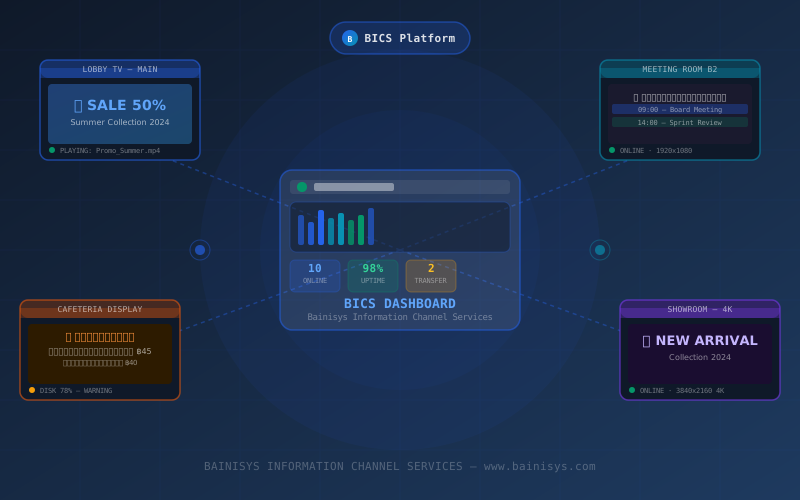
BICS (Bainisys Information Channel Services) คือแพลตฟอร์มสำหรับบริหารจัดการ Digital Signage และช่องทางการสื่อสารภายในองค์กร ผู้ดูแลระบบสามารถจัดการคอนเทนต์และอุปกรณ์จอแสดงผลหลายจุดผ่าน Dashboard เดียว เพื่อให้ข้อมูลบนแต่ละหน้าจอเป็นปัจจุบัน และสามารถนำเสนอคอนเทนต์ให้เหมาะกับพื้นที่หรือช่วงเวลาที่กำหนด
BICS รองรับการใช้งานสำหรับธุรกิจในประเทศไทยและองค์กรในภูมิภาคอาเซียน โดยสามารถเลือกรูปแบบการติดตั้งได้ทั้ง Cloud, Private Cloud และ On-Premises เพื่อให้เหมาะกับโครงสร้างพื้นฐานและข้อกำหนดของแต่ละองค์กร นอกจากนี้ แพลตฟอร์มยังรองรับการจัดการและแสดงผลคอนเทนต์ภาษาไทยอีกด้วย
ประโยชน์หลักของระบบ BICS Digital Signage

ออกแบบมาเพื่อรองรับการใช้งานในองค์กร
BICS รองรับการใช้งานตั้งแต่ระบบที่มีหน้าจอเพียงไม่กี่จอ ไปจนถึงองค์กรที่มีหน้าจอหลายจุดหรือหลายสาขา ไม่ว่าจะเป็นธุรกิจขนาดเล็ก องค์กรขนาดใหญ่ หรือธุรกิจที่มีหลายสาขา ก็สามารถบริหารจัดการอุปกรณ์ที่เชื่อมต่อทั้งหมดผ่านระบบส่วนกลางได้

รองรับการใช้งานภาษาไทยอย่างครบถ้วน
ระบบรองรับเมนูภาษาไทยและฟอนต์ภาษาไทยแบบ Unicode พร้อมทีมงาน BAINISYS ในประเทศไทยที่ให้การสนับสนุนด้านการใช้งานและการดูแลระบบ ช่วยให้องค์กรสามารถประสานงานและบริหารระบบได้อย่างสะดวก

ติดตั้งและเริ่มใช้งานได้ง่าย
ระบบออกแบบขั้นตอนการตั้งค่าให้เป็นลำดับ ช่วยให้ทีมงานสามารถเพิ่มอุปกรณ์ จัดกลุ่มหน้าจอ และเริ่มเผยแพร่คอนเทนต์ได้โดยไม่ต้องผ่านขั้นตอนที่ซับซ้อน
ฟีเจอร์หลักของ BICS
6 โมดูลหลัก
บริหารจัดการอุปกรณ์จากส่วนกลาง
เพิ่ม ลบ หรือแก้ไขข้อมูลอุปกรณ์ทั้งหมดผ่าน Dashboard เดียว พร้อมตรวจสอบสถานะอุปกรณ์ IP Address และพื้นที่จัดเก็บข้อมูลแบบ Real-time รวมถึงรองรับการนำเข้าข้อมูลผ่านไฟล์ CSV
จัดการคอนเทนต์และ Playlist
อัปโหลดและจัดการวิดีโอ รูปภาพ และไฟล์ HTML ผ่าน Content Library พร้อมสร้าง Playlist ด้วยเครื่องมือ Drag-and-Drop และกำหนดรูปแบบการแสดงผลที่แตกต่างกันให้กับแต่ละหน้าจอได้
กำหนดเวลาเผยแพร่คอนเทนต์
กำหนดวันที่ เวลา และกลุ่มอุปกรณ์สำหรับการเผยแพร่คอนเทนต์แต่ละรายการ พร้อมตั้งตารางการเผยแพร่แบบอัตโนมัติ ทั้งคอนเทนต์ที่แสดงเป็นประจำ คอนเทนต์พิเศษ และประกาศเร่งด่วน
Dashboard และการตรวจสอบสถานะแบบ Real-time
ตรวจสอบสถานะอุปกรณ์ที่เชื่อมต่อทั้งหมด และรับการแจ้งเตือนเมื่ออุปกรณ์ Offline หรือพื้นที่จัดเก็บข้อมูลใกล้เต็ม พร้อมตรวจสอบประวัติการทำงานย้อนหลังผ่าน Activity Log
ออกแบบหน้าจอแบบ Multi-Zone
ออกแบบ Layout ได้โดยไม่ต้องเขียนโค้ด พร้อมแบ่งพื้นที่บนหน้าจอออกเป็นหลายโซน เพื่อแสดงคอนเทนต์หลายรูปแบบพร้อมกัน เช่น วิดีโอ ข้อความเลื่อน และ QR Code บนหน้าจอเดียว
ระบบอัตโนมัติช่วยลดภาระงานของทีม IT
ตั้งค่าการทำงานประจำให้เป็นอัตโนมัติ เช่น การ Restart อุปกรณ์ การล้าง Cache การส่งรายงาน และการแจ้งเตือนผ่านอีเมล ช่วยลดขั้นตอนงานประจำและทำให้ทีม IT ดูแลระบบได้สะดวกยิ่งขึ้น
BICS เหมาะกับธุรกิจและองค์กรประเภทใด?
โรงแรมและธุรกิจบริการ
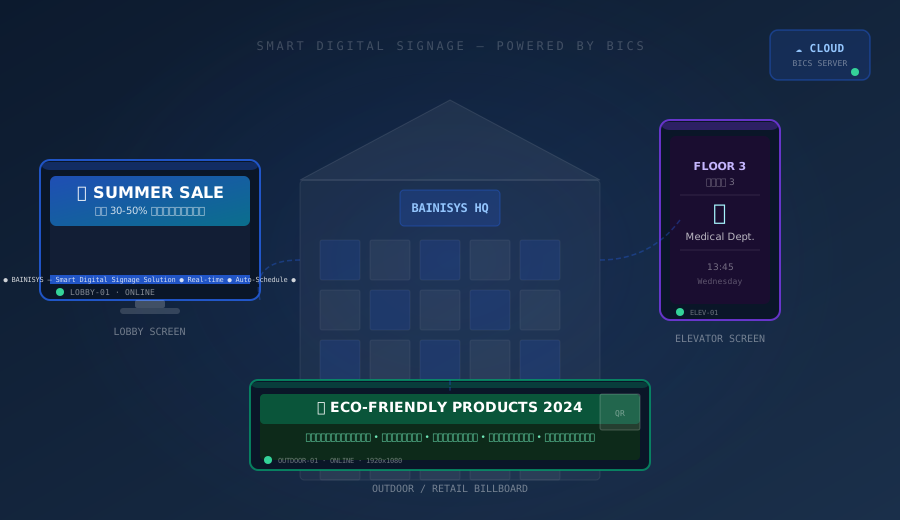
BICS ช่วยให้โรงแรมสามารถนำเสนอข้อมูลห้องพัก โปรโมชั่น ตารางกิจกรรม และข้อมูลบริการต่าง ๆ ผ่านหน้าจอบริเวณล็อบบี้ ลิฟต์ และพื้นที่ส่วนกลาง เพื่อให้ผู้เข้าพักเข้าถึงข้อมูลได้สะดวก
ศูนย์การค้าและธุรกิจค้าปลีก
ทีมงานสามารถเผยแพร่โปรโมชั่น อัปเดตราคาสินค้า และกระจายแคมเปญจากส่วนกลางไปยังหน้าจอในหลายสาขา ช่วยให้การอัปเดตข้อมูลทำได้รวดเร็วและเป็นไปในทิศทางเดียวกัน
โรงพยาบาลและคลินิก
BICS สามารถใช้แสดงข้อมูลคิวผู้ป่วย ข้อมูลห้องตรวจ คำแนะนำด้านสุขภาพ และประกาศสำหรับผู้มาใช้บริการผ่านหน้าจอในพื้นที่รอรับบริการ
โรงงานและสำนักงาน
องค์กรสามารถใช้จอดิจิทัลเพื่อสื่อสาร KPI ข่าวสารภายใน ตารางการประชุม และข้อมูลด้านความปลอดภัย ช่วยให้พนักงานได้รับข้อมูลสำคัญผ่านช่องทางการสื่อสารภายในองค์กรได้อย่างทั่วถึง
รูปแบบการติดตั้ง BICS
BICS รองรับรูปแบบการติดตั้งที่หลากหลาย เพื่อให้เหมาะกับนโยบาย โครงสร้างพื้นฐาน และข้อกำหนดด้านการบริหารระบบของแต่ละองค์กร ได้แก่
Cloud
ใช้งานและบริหารจัดการ Digital Signage ผ่านระบบ Cloud ช่วยให้สามารถอัปเดตระบบและจัดการหน้าจอที่ติดตั้งในหลายพื้นที่หรือหลายสาขาได้สะดวกจากส่วนกลาง
On-Premises
ติดตั้ง BICS บนโครงสร้างพื้นฐานภายในองค์กร เหมาะสำหรับองค์กรที่ต้องการควบคุมข้อมูล การเข้าถึงเครือข่าย และนโยบายด้านความปลอดภัยภายในได้อย่างใกล้ชิด
Private Cloud
ติดตั้ง BICS บนสภาพแวดล้อม Cloud ที่จัดสรรสำหรับองค์กรโดยเฉพาะ เหมาะสำหรับองค์กรที่ต้องการแยกทรัพยากร กำหนดมาตรการด้านความปลอดภัยให้เหมาะกับองค์กร หรือมีข้อกำหนดเฉพาะด้านการกำกับดูแลข้อมูล (Data Governance)
Frequently Asked Questions About BICS
BICS ย่อมาจากอะไร?
BICS ย่อมาจาก Bainisys Information Channel Services เป็นแพลตฟอร์มที่พัฒนาโดย BAINISYS สำหรับบริหารจัดการ Digital Signage และช่องทางการสื่อสารข้อมูลภายในองค์กร
BICS ใช้สำหรับอะไร?
BICS ใช้สำหรับบริหารจัดการคอนเทนต์ กำหนดเวลาเผยแพร่ และตรวจสอบอุปกรณ์จอแสดงผลหลายจุดผ่านระบบส่วนกลาง ช่วยให้ผู้ดูแลระบบสามารถจัดการหน้าจอต่าง ๆ ได้จากที่เดียว
BICS รองรับรูปแบบการติดตั้งแบบใดบ้าง?
BICS รองรับการติดตั้งทั้งแบบ Cloud, On-Premises และ Private Cloud เพื่อให้องค์กรสามารถเลือกรูปแบบที่เหมาะกับโครงสร้างพื้นฐาน นโยบายด้านความปลอดภัย และข้อกำหนดด้านการกำกับดูแลข้อมูล (Data Governance)
BICS รองรับคอนเทนต์รูปแบบใดบ้าง?
BICS รองรับวิดีโอ รูปภาพ และไฟล์ HTML ผ่าน Content Library ส่วนการรองรับเอกสาร Data Feed, Streaming Content และไฟล์หรือเวอร์ชันเฉพาะ ควรตรวจสอบกับทีม BAINISYS ก่อนนำระบบไปใช้งานจริง
BICS เหมาะสำหรับองค์กรที่มีหลายสาขาหรือไม่?
เหมาะแน่นอน ผู้ดูแลระบบสามารถจัดกลุ่มหน้าจอและกำหนดคอนเทนต์ที่แตกต่างกันตามสาขา พื้นที่ หรือช่วงเวลาที่ต้องการผ่านระบบบริหารจัดการจากส่วนกลางได้
เริ่มบริหารจัดการ Digital Signage ด้วย BICS
พูดคุยกับทีม BAINISYS เพื่อประเมินจำนวนหน้าจอ ความต้องการด้านคอนเทนต์ การเชื่อมต่อระบบ และเลือกรูปแบบการติดตั้ง BICS ที่เหมาะกับโครงสร้างพื้นฐานและการใช้งานขององค์กร
- บริหารจัดการหน้าจอจากส่วนกลาง
- ตั้งเวลาเผยแพร่คอนเทนต์อัตโนมัติ
- กำหนดเวลาเผยแพร่คอนเทนต์อัตโนมัติ
- ออกแบบมาเพื่อรองรับการใช้งานในระดับองค์กร